




Managing a team of drivers or service technicians is a constant juggle. You're dealing with scheduling chaos, tracking your team, and trying to keep customers happy—it's a lot for any operation to handle. This is where the right tools make all the difference. Finding the best field service management software for small business can transform your daily workflow. This guide will help you find the best FSM software, an affordable solution that streamlines your work and helps you deliver the professional service that builds trust.
Field service companies face numerous difficulties in their daily operations, such as tracking their technicians, managing customer expectations, and assigning jobs - and that’s just for starters.
Operating your field service business without management software means giving up valuable time. One survey asked over 1,200 fleet executives and managers how they scheduled their jobs. Up to 26% used field service management software, 25% used an online spreadsheet managed by a team member, and 25% used a manual method, such as a whiteboard.
According to this data, only 1 in 4 fleet companies has taken advantage of field service management software. In this article, we’ll explore the features and benefits of this type of software.
What is field service management software?
Field service management (FSM) software is a tool designed to help businesses organize and manage work that happens outside the office. Think of it as a digital command center for your mobile workforce. If you run a business in construction, HVAC, or landscaping, you know the challenge of coordinating technicians, scheduling jobs, and keeping customers informed. FSM software connects your office staff with your field team in real time, ensuring everyone has the information they need to get the job done right. This eliminates the confusion that comes with paper-based systems or endless phone calls, creating a smoother workflow for everyone involved.
The core of FSM software is its ability to streamline daily tasks. It handles everything from scheduling and dispatching the nearest technician to a job, to managing work orders and even handling invoicing once the work is complete. Instead of relying on a whiteboard or a complicated spreadsheet, you can automate these processes. This not only saves a ton of administrative time but also improves accuracy. When combined with powerful fleet tracking capabilities, FSM software gives you a complete picture of your operations. You can see where your technicians are, assign jobs more efficiently, and provide customers with accurate arrival times, which builds trust and improves satisfaction.
How can field service management software help your business?
Field service management software helps manage a company's resources, including the equipment and employees in the field. This technology affects every part of the business. Some of the features include:
- Scheduling and assigning work orders
- Communicating with team members in the field
- Dispatching employees to work assignments
- Sharing customer history and job data with field employees
- Collecting field data, such as requests for information, job completions, and times of arrival
- Managing product availability and inventory
- Routing field service technicians and other employees to specific jobs
- Tracking and optimizing fleet routes
- Overall fleet reporting and analytics
FSM software helps to address problems such as under-skilled technicians, over-scheduled resources, and disjointed communications. Instead of manually scheduling jobs, dispatching appointments, and finding the right employee with the right qualifications, software solutions automate all three of these operational bottlenecks.
Improve first-time fix rates
Nothing satisfies a customer more than getting their problem solved on the first try. A high first-time fix rate not only leads to happier customers but also makes your entire operation more efficient. Field service management (FSM) software is a game-changer here, as it equips your technicians with the information they need to do their work better and faster. By giving them access to customer history, job details, and required parts before they even arrive on-site, you eliminate guesswork. This preparation ensures they have the right tools and knowledge to handle the job correctly on the first visit, reducing the need for follow-up appointments and improving your team's productivity.
Streamline cash flow
Waiting for payments can put a strain on any business. FSM software helps you get paid faster by automating and simplifying the entire process from job completion to invoicing. By tracking jobs in real time, you can generate an invoice the moment a task is marked as complete. Technicians can capture digital signatures and proof of service right in the field, which reduces disputes and delays. According to Zendesk, this automation helps businesses get paid faster by speeding up billing and reducing errors. This means a more predictable and healthier cash flow, allowing you to focus on growing your business instead of chasing down payments.
Accelerate technician training
Getting new technicians up to speed quickly is essential for any growing field service business. FSM software can act as a digital mentor, helping new hires learn the ropes with confidence. The software provides access to a wealth of information, including detailed customer histories, notes from previous jobs, and step-by-step guides for complex tasks. This on-demand support allows new team members to become productive much faster. Instead of relying solely on senior technicians for guidance, they can find answers within the platform, ensuring they follow best practices and maintain a high standard of service from day one. This approach not only speeds up onboarding but also promotes a safer, more consistent work environment for your entire team.
Key features to look for in FSM software
When you start looking at different FSM software options, you’ll notice they all offer a wide range of features. The key is to find a solution that addresses the specific needs of your field service business. A platform that works for a long-haul trucking company might not be the right fit for a local plumbing service. Understanding the core features will help you cut through the noise and focus on what will truly make a difference for your team’s efficiency and your company’s bottom line. From managing work orders to optimizing routes and tracking valuable assets, the right set of tools can transform your daily operations from a constant scramble into a well-oiled machine.
Think about the entire lifecycle of a service call, from the moment a customer reaches out to the final invoice. A comprehensive FSM solution touches every step of that process. It helps you dispatch the right technician with the right skills and parts, ensures they arrive on time, gives them the information they need to do the job correctly on the first visit, and captures all the necessary data for billing and reporting. Let’s break down some of the most important features you should be looking for.
Work order management
At its core, FSM software is designed to perfect your work order management. This feature digitizes and centralizes the entire process of creating, assigning, and tracking jobs. Instead of relying on paper, whiteboards, or messy spreadsheets, you can dispatch work orders to your technicians’ mobile devices in real time. This includes all the critical details they need: customer information, job location, description of the issue, and any relevant service history. This ensures your team in the field is always equipped with the right information, which helps them work more efficiently and complete jobs faster. It also provides a clear, accessible record of all work performed.
Route optimization
Getting your technicians from one job to the next efficiently is a daily puzzle that directly impacts your fuel consumption, labor, and customer satisfaction. Route optimization is a critical feature that solves this puzzle for you. Instead of manually planning routes, the software automatically calculates the most efficient path for your drivers based on job locations, traffic patterns, and appointment windows. This not only saves significant time and fuel but also allows you to fit more service calls into the day. Better routing means your technicians spend less time behind the windshield and more time on-site, helping customers and completing jobs.
How Azuga helps with route optimization
Manual scheduling often leads to operational bottlenecks like sending an under-skilled technician to a complex job or dealing with disjointed communication. Azuga’s route optimization automates these logistical challenges. Our platform helps you dispatch appointments and find the most qualified employee for the job without the manual guesswork. By planning the most efficient multi-stop routes, you can ensure your team arrives on time, reduce drive time between jobs, and improve overall productivity. This streamlined process helps you serve more customers each day while keeping your operational overhead in check.
Asset and inventory management
Showing up to a job without the right part or tool is frustrating for both the technician and the customer. Strong asset and inventory management features prevent this by giving you real-time visibility into your stock levels, whether in the warehouse or on a service vehicle. The software can track parts usage, automate reorder points, and help you manage your valuable equipment. This ensures that your technicians are always prepared for the job at hand, which is essential for improving first-time fix rates and avoiding costly return visits. It also helps in tracking and maintaining high-value equipment to prevent loss or theft.
Tracking equipment with Azuga
Your equipment and assets are vital to your business, but they’re often spread across various job sites, making them difficult to track. Azuga’s asset tracking solutions give you complete visibility over your valuable tools and machinery. By attaching our durable GPS trackers, you can monitor the location and status of your assets in real time. This not only helps prevent theft and loss but also improves utilization by ensuring you know exactly where every piece of equipment is. This capability is crucial for collecting accurate field data and ensuring your resources are always where they need to be.
Customer communication tools
Keeping your customers in the loop is fundamental to providing great service. FSM software often includes tools that automate customer communication, such as sending appointment reminders, status updates, and notifications when a technician is on their way. These platforms can also give your field employees access to the customer’s complete service history on their mobile device. This context allows them to provide a more personalized and informed service experience. When your team can greet a customer by name and already knows the history of their equipment, it builds trust and reinforces your company’s professionalism.
Offline mobile capabilities
Your technicians often work in areas with spotty or non-existent internet service, like basements, rural locations, or new construction sites. That’s why offline mobile capabilities are a must-have feature. A robust FSM mobile app allows your team to continue accessing work order details, customer information, and service forms even without a connection. They can complete their work, capture photos, collect signatures, and log their notes as usual. Once their device reconnects to the internet, the app automatically syncs all the data back to the main system, ensuring no information is lost and administrative delays are avoided.
Lead management
While the primary function of FSM software is to manage existing service operations, some advanced platforms also include features for lead management. This allows your technicians in the field to identify and capture new sales opportunities. For example, while performing a routine repair, a technician might notice another piece of equipment that is aging and recommend a replacement. With an integrated lead management tool, they can log this opportunity directly in their mobile app, instantly sending the information to your sales team for follow-up. This turns your service team into a proactive source of new business.
The growing role of artificial intelligence (AI)
Artificial intelligence is no longer a futuristic concept; it’s a practical tool that is actively reshaping field service management. AI is shifting the industry from a reactive model—fixing things after they break—to a proactive and even predictive one. Instead of just helping you manage your daily schedule, AI-powered FSM software can anticipate future needs, automate complex decisions, and provide intelligent recommendations to your team. This technology analyzes vast amounts of data from your operations to identify patterns and make predictions that would be impossible for a human to spot, ultimately making your entire operation smarter, faster, and more efficient.
Predictive maintenance
One of the most powerful applications of AI in field service is predictive maintenance. Instead of following a rigid, time-based maintenance schedule, this technology uses data from sensors on your equipment to predict when a failure is likely to occur. This allows you to schedule service just before it’s needed, preventing unexpected downtime and extending the life of your assets. Some systems even use AI agents—smart tools that can automatically schedule a maintenance job, assign the right technician, and order the necessary parts, all without human intervention. This proactive approach is key to offering superior service and managing your scheduled maintenance effectively.
Automated scheduling and dispatch
Scheduling and dispatching is a complex puzzle with many moving pieces: technician skill sets, availability, location, traffic conditions, job priority, and customer promises. AI-powered automated scheduling solves this puzzle in seconds. The system analyzes all these variables to create the most optimal schedule possible, ensuring the right technician is assigned to the right job every time. If a technician is running late or a high-priority emergency call comes in, the AI can automatically re-shuffle the schedule for the entire team to accommodate the change, minimizing disruption and keeping everything on track.
How to choose the right software for your team
Selecting the right FSM software is a significant decision that will impact every aspect of your field operations. With so many options available, it’s important to approach the selection process with a clear strategy. The goal is to find a solution that not only solves your current challenges but can also grow with your business. It’s not just about the features on paper; it’s about how the software fits your team’s workflow, integrates with your existing systems, and is supported by the provider. Taking the time to make a thoughtful choice now will pay dividends in improved efficiency, happier employees, and more satisfied customers down the road.
Identify your biggest challenges
Before you even look at a demo, take a step back and identify the biggest pain points in your current operations. Are you struggling with inefficient routing? Are first-time fix rates too low because of poor inventory management? Is communication between the office and the field a constant source of frustration? Make a list of your top three to five challenges. This list will become your scorecard for evaluating different software solutions. By focusing on solving your most significant problems first, you can ensure that your investment delivers a real, measurable return.
Prioritize ease of use and adoption
The most feature-rich software in the world is useless if your team finds it too complicated to use. Prioritize a solution with a clean, intuitive interface that is easy for both your office staff and your field technicians to learn. Pay special attention to the mobile app, as this is what your team in the field will use every day. A good mobile app should be straightforward and reliable, even in offline mode. Ask for a trial period to let your team test it out in a real-world setting. High user adoption is the key to getting the full value from your FSM software.
Look for industry-specific solutions
Field service operations can vary dramatically between industries. The needs of an HVAC company are very different from those of a landscaping business or a long-haul trucking fleet. Look for FSM software that is designed for or can be easily configured for your specific industry. These solutions often come with pre-built workflows, terminology, and features that are tailored to your unique operational needs. An industry-specific solution will require less customization and will feel more natural for your team to use from day one, accelerating your time to value.
Check for essential integrations
Your FSM software doesn’t operate in a vacuum. It needs to communicate with the other business systems you rely on, such as your accounting software, CRM, and payroll systems. Check for essential integrations to ensure a seamless flow of data across your entire organization. Without proper integration, you risk creating data silos and forcing your team to waste time with manual data entry between different programs. A well-integrated system ensures that information from a completed work order automatically flows to your invoicing software, saving time and reducing administrative errors.
Find a scalable solution with reliable support
Your business is going to grow, and your FSM software needs to be able to grow with it. Look for a scalable solution that can handle an increasing number of users, vehicles, and jobs without a drop in performance. Furthermore, evaluate the provider’s customer support. When you have a question or run into an issue, you need to know that you can get timely and helpful assistance. A strong partnership with your software provider, backed by reliable support, is crucial for long-term success.
6 best field service management software options for small businesses
If you’re looking for the best field service management software for small businesses, we’ve compiled a list of the top FSM software solutions available. Every small business in the field service industry should consider an FSM tool to help automate and scale their business.
1. BlueFolder
BlueFolder is an FSM tool designed to improve technicians’ efficiency. This solution displays recurring jobs and offers equipment tracking, billing, automated scheduling, and simple work order management. Their client base includes commercial HVAC, security, commercial food equipment service, facilities maintenance, medical equipment service, and manufacturing equipment service. It’s also compatible with many accounting solutions, including FreshBooks, Xero, and QuickBooks. This software takes only a few hours to get up and running and features an easy-to-use dashboard.
2. Skedulo
Skedulo is a cloud-based solution that simplifies complex scheduling tasks, such as organizing work assignments, setting appointments, and improving customer experience. Skedulo’s platform accounts for travel time and other obligations so that customers receive more accurate arrival times instead of the dreaded “service window.” This software allows you to optimize your schedule, reduce downtime, and increase the number of work orders you can handle.
3. Field Nation
Field Nation has a marketplace filled with highly skilled field technicians in many industries ready to complete work orders on a freelance basis. Companies that join Field Nation can find technicians, post jobs, and manage their projects across many industries.
Field Nation takes the guesswork out of searching for the right technician; hiring managers can view every technician's reviews and qualifications before reaching out. It also helps fleet business owners and managers find contractors, assign them work orders, manage their projects, and process payments.
4. ServiceTitan
ServiceTitan is an all-inclusive FSM software that helps with four different aspects of your small business: sales and marketing, daily operations, accounting and finance, and customer service. Most other FSM tools only help organizations with their day-to-day operations, but ServiceTitan helps in all aspects.
ServiceTitan has an intuitive dashboard for dispatching, allowing fleet managers to assign the designated technician to the work order by simply drag and drop. You can quickly reschedule, shorten, or extend work orders, which helps counter any last-minute scheduling problems. Additionally, this tool helps with call booking, finance reporting, and even seamless tracking reminders so customers can see when your technicians will arrive.
5. Jobber
Manual data entry can result in inaccuracies, confusion, and wasted time. Jobber is an affordable FSM software designed to serve small businesses better. Unlike other FSM tools, this one has a CRM database built-in for you to track every detail about your clients. A CRM is useful for follow-ups or ensuring that technicians remember essential information about a project.
Jobber even offers a client hub for your clients to access your services quickly. Clients can access this hub to pay invoices, check appointments, approve quotes, receive notifications, and book future appointments. It also provides a built-in calendar with color coding and drag-and-drop buttons for users to easily schedule work orders.
6. Housecall Pro
Highly regarded in the residential service sector, Housecall Pro is a comprehensive platform that helps manage your entire workflow. It excels at automating daily tasks, from scheduling and dispatching technicians to processing payments and sending customer reminders. By bringing all these functions into one place, it helps streamline your operations, letting you manage appointments and communications without juggling multiple apps. This consolidation not only improves your team's efficiency but also enhances customer satisfaction by providing a smooth and professional experience from start to finish. For businesses focused on home services like HVAC, plumbing, or electrical work, this tool can be a game-changer for managing day-to-day jobs.
7. Kickserv
Kickserv is a fantastic option for small teams looking for robust job management features without being overwhelmed. It provides all the essentials, including scheduling, invoicing, and customer management tools, designed to improve your daily workflow. One of its standout features is its seamless integration with QuickBooks, which is a huge plus for businesses wanting to keep their financial tracking and operational management in sync. This connection helps streamline everything from quoting to payment, reducing manual data entry and potential errors. If you're a small business aiming to organize your jobs and simplify your accounting process, Kickserv offers a straightforward and effective solution.
8. Salesforce Field Service
For businesses ready to leverage advanced technology, Salesforce Field Service is a top-tier choice that uses AI to help your team work smarter. It gives both agents and technicians a complete view of customer history and asset information, which is vital for delivering effective service on the first visit. The platform’s AI-powered tools can optimize scheduling and dispatching, ensuring the right technician with the right skills and parts is sent to every job. This level of intelligence is crucial for complex operations and can significantly improve service delivery. When combined with precise asset management, you gain total visibility over both your people and your equipment, creating a highly efficient field operation.
6. Azuga
Azuga helps you manage your entire field service business within a single platform. Unlike other FSM software, Azuga allows users to track the location of their technicians in real-time. Users can optimize their routes and schedules by adding multiple locations and stops. The platform also integrates with Azuga SafetyCam and Azuga Fleet, enabling in-cab coaching through dual-face dashcam capabilities and buzzers.
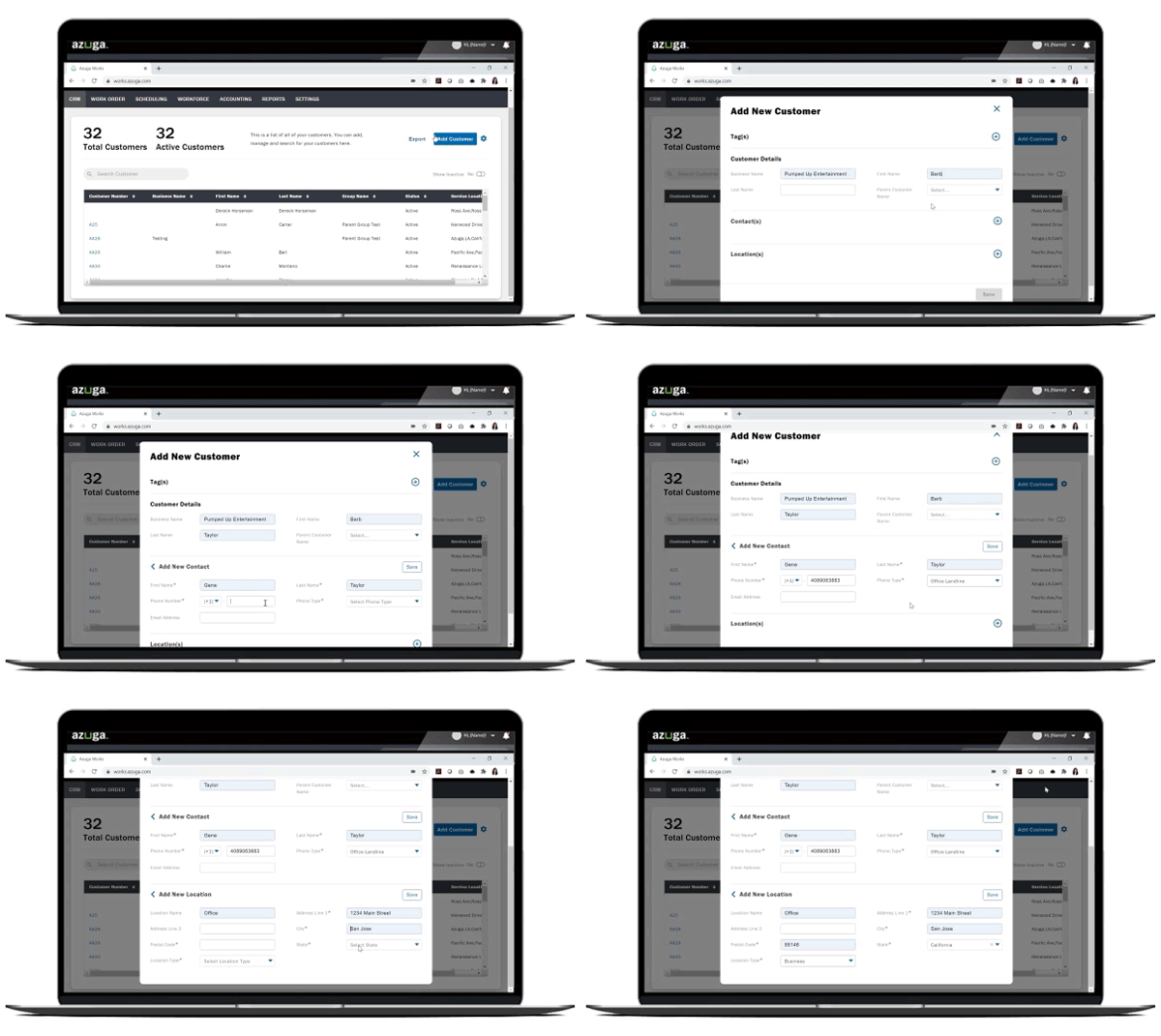
Simplify your operations with Azuga field service management
Every field-based organization needs FSM software to help optimize and manage their business activities efficiently. Completing day-to-day management tasks using old, manual methods can increase costs and labor, and reducing productivity. Conversely, implementing field management software can automate your processes, streamlining daily operations. Azuga offers features to help your fleet save thousands of dollars per year. Scale your small business by utilizing FSM software to assist with scheduling, dispatching, accounting, and customer service.
Check out Azuga fleet tracking software and give your fleet managers the right tools to track their vehicles and assets while improving driver safety.
Frequently Asked Questions
Is FSM software really necessary for a small team like mine? Absolutely. In fact, small teams often see the biggest impact. When you have fewer people, every minute saved on administrative tasks like scheduling or routing is a minute you can spend on another job. FSM software automates the manual work that bogs down small operations, helping you compete with larger companies by providing professional, organized service without needing a huge back-office staff.
My team isn't the most tech-savvy. How difficult is this software to learn and use? This is a common and valid concern. The best FSM software is designed with your field team in mind, featuring intuitive mobile apps that are as easy to use as your favorite social media app. Look for a solution that prioritizes a clean interface and straightforward workflows. A good provider will offer training and support to ensure everyone, from the office to the field, feels confident using the new tools from day one.
How is FSM software different from the spreadsheets and map apps I'm already using? While spreadsheets and map apps can handle individual tasks, they don't communicate with each other. FSM software integrates everything into one system. It connects your schedule to your routes, your routes to your customer notifications, and your job completion notes to your invoices. This eliminates the need for double data entry and prevents the communication breakdowns that happen when information is scattered across different, disconnected tools.
What's the most important feature to look for if I'm just starting out? If you're new to FSM software, focus on the fundamentals that solve your biggest headaches. Start with solid work order management and a smart scheduling and dispatching tool. These two features form the core of any field service operation. Mastering how you create, assign, and track jobs will immediately improve your team's efficiency and lay a strong foundation for adding more advanced features later.
Will my technicians be able to use the software if they're working in a remote area with no internet? Yes, provided you choose a platform with offline capabilities. This is a critical feature for any business whose team works in basements, new construction sites, or rural areas. A robust mobile app will allow your technicians to access job details, fill out forms, and capture signatures without a connection. The app then automatically syncs all the new information once service is restored, ensuring no data is lost.
Key Takeaways
- Streamline your operations: Adopt FSM software to automate key tasks like scheduling and dispatching, helping you replace inefficient manual processes and improve your team's productivity.
- Focus on essential features: Prioritize a solution with strong route optimization, asset management, and mobile capabilities to ensure your team is always prepared, on schedule, and effective in the field.
- Find the right fit for your team: Start by identifying your biggest operational challenges, then select a user-friendly platform that can grow with your business and integrate with your existing systems.
Related Articles
- Best Field Service Management Software for Small Business
- Benefits of Field Service Management Software For Small Business
- The Best Field Service Management Features for Small Businesses
- Make Your Small Business More Efficient With FSM Systems | Azuga
- Field Service Management Software for Small Businesses: Top Features



