


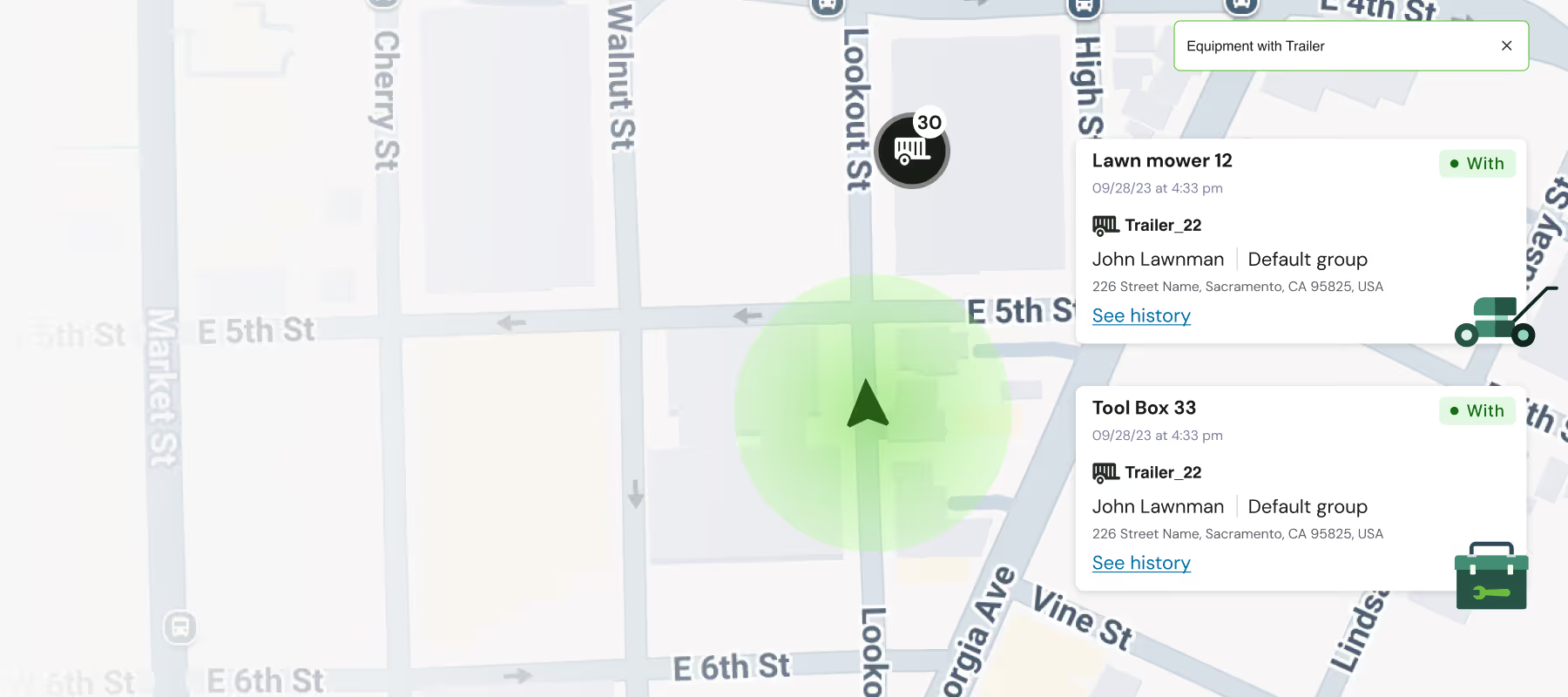

Losing track of tools and equipment is more than just an annoyance. It's a direct hit to your bottom line, causing project delays and unnecessary replacement costs. Our Azuga asset tracker uses small, durable fleet BLE tags to solve this exact problem. This innovative fleet management bluetooth beacon system gives you a clear view of your equipment's last-known location, right from your dashboard. We’ll show you how these simple devices work and how they can streamline your daily workflow.
What is Equipment Tracking?
Equipment Tracking uses location-aware technology to monitor the whereabouts of small equipment and tools. With Azuga Equipment Tracking, you can:
- Reduce Costs and Downtime: Minimize the financial impact and operational delays caused by misplaced or stolen equipment.
- Improve Operational Efficiency: Ensure the right tools are at the right place and time, reducing the need to reschedule jobs.
- Live Map: Use a single live map to track the locations of vehicles, heavy assets, and equipment in real-time.
- Inform Planning: Knowing the exact location of your equipment in relation to your team and job site can help you plan better.
- Simple Asset Utilization Analysis: Ensure optimal usage using geofences for asset utilization analysis.
"Enhanced visibility in equipment tracking is a game-changer for fleet management, offering real-time insights into equipment location and usage. With clear visibility, fleet managers can respond quickly to operational needs, optimize resource allocation, and improve decision-making. This level of transparency not only reduces downtime and operational inefficiencies but also strengthens service reliability and enables more proactive maintenance, driving long-term performance and cost savings."
- Azuga VP of Product, Fatima Howes
Azuga Fleet's equipment tracking system leverages next-gen GPS Asset Trackers with bluetooth gateways to detect BLE location beacons, providing an effective and economical solution for tracking tools and equipment. Asset trackers installed in trucks or trailers are able to keep track of the equipment within. Asset trackers can also be installed in locations where equipment is stored or in use, like warehouses or job sites.
Azuga Equipment Beacons: These location beacons are low power, have long battery life, are IP67 rated for dust and water resistance, and are impact-resistant.
- Easy Self-Setup: Fast and simple setup process.
- 40-60 ft average detection range.
Equipment Statuses: Azuga Fleet's BLE equipment beacons have two primary statuses:
- With: When equipment is detected by an asset tracker, the status “with” signifies that the equipment is within the tracker's 40-60 ft detection range. The location shown for the equipment is based on the location of the GPS asset tracker.
- Dropped Off: When the equipment is not detected, the status “Dropped” shows its last known location, and when it was last detected.
Manage your assets and small equipment with ease. Here are some example use cases.
How Bluetooth beacon technology works
Bluetooth beacons are small, wireless devices that broadcast a simple signal using Bluetooth Low Energy (BLE). Think of them as tiny lighthouses for your equipment. Nearby devices, like smartphones or dedicated GPS trackers, can detect these signals to determine their proximity to the beacon. In a fleet setting, you attach these BLE beacons to your tools and equipment. As a vehicle equipped with an Azuga GPS tracker passes by, it acts as a gateway, detecting the beacon's signal and reporting the equipment's location back to your system. This gives you a last-seen location on your live map, forming the backbone of modern, efficient equipment management.
Bluetooth beacons vs. other tracking technologies
While several technologies can track assets, BLE strikes an excellent balance between accuracy, scalability, and operational efficiency. It delivers reliable accuracy for most job sites and warehouses, typically ranging from one to three meters. This makes it a practical and effective choice for general asset tracking without requiring a complex infrastructure. It’s a straightforward solution that integrates easily into your existing operations, providing the visibility you need without unnecessary complications.
UWB (ULTRA-WIDEBAND)
Ultra-Wideband offers incredible precision, pinpointing locations down to a few centimeters. However, this accuracy comes with significant trade-offs. UWB systems require a more involved setup, specialized hardware, and have limited compatibility with existing devices, making them less versatile for dynamic fleet environments.
WI-FI POSITIONING
Using existing Wi-Fi networks for positioning can be convenient, as it leverages infrastructure that may already be in place. The downside is that its accuracy can vary widely depending on the number and placement of access points. This inconsistency makes it less reliable for tracking specific, high-value tools on a busy job site.
RFID
Radio-Frequency Identification (RFID) is a stable and simple technology, but it’s designed for different use cases. RFID systems are great for scanning items as they pass a fixed checkpoint, like in a warehouse doorway. They don't provide the continuous, real-time location updates needed to track equipment movement across a work area.
The network effect
The effectiveness of a BLE tracking system grows with every device you add. Each vehicle equipped with an Azuga tracker contributes to the network, creating more opportunities to detect your tagged equipment. The more gateways you have in the field, the more robust and up-to-date your location data becomes, building a powerful tracking ecosystem for your entire operation.
Factors that affect accuracy
It’s important to remember that the physical environment can influence any wireless technology. The accuracy of a BLE system can be affected by new machinery, metal shelving, or even large groups of people. To ensure optimal performance, it's good practice to perform regular checks and make small adjustments as your work environment changes.
Common technical standards
Most modern beacons are versatile and can support several communication standards, like iBeacon and Eddystone. For fleet managers, the key takeaway is that the technology is standardized and reliable. This standardization ensures that the beacons will communicate seamlessly with your Azuga system, providing a dependable and interoperable solution you can trust without worrying about compatibility issues.
Key technical specifications and features
When selecting beacons for your equipment, a few key features make a big difference in performance and reliability. Not all beacons are built for the tough conditions of a construction site or the demands of a mobile workforce. Focusing on durability, battery performance, and signal strength ensures you get a solution that lasts and performs when you need it most. These details are what separate a good tool from a great one.
Battery life
A major advantage of Bluetooth Low Energy is its minimal power consumption. Depending on the model and its transmission settings, beacon batteries can typically last between two and five years. This long lifespan means you can attach them to your equipment and trust them to work for years with little to no maintenance, giving you one less thing to worry about.
Positioning accuracy and signal range
Under ideal conditions with a clear line of sight, some BLE beacons can transmit signals up to 300 feet. However, in a real-world setting with obstacles like walls and machinery, a practical detection range is closer to 40-60 feet. This provides a reliable bubble of awareness around each of your vehicles and job sites, which is perfect for confirming what equipment is with which truck.
Beacon types for different jobs
Your equipment varies, and so should your beacons. Different assets require different types of tags based on their size, shape, and how they are used. Look for beacons with durable, IP67-rated casings that are resistant to dust and water. Flexible mounting options—like industrial adhesives, zip ties, or screws—ensure you can securely attach a beacon to everything from a power drill to a portable generator.
Inform Job Planning
Efficient job planning becomes easier with Azuga Fleet's tracking system. Before heading to a job, you can:
- Check Tool Availability: See what tools are already in your trailer.
- Locate Missing Tools: Find out the location of any missing tools and whether similar tools are nearby.
Examples:
- See what tools are in your trailer before heading out to do a job.
- If a tool is missing, locate it quickly. If it's too far, find another similar tool nearby.
Locate Lost and Misplaced Tools
Ensure your job sites have all the necessary tools. With Azuga Fleet, you can:
- Pick-Up Alerts: Receive alerts if any equipment is left behind.
- Dropped-Off Equipment: Track and locate all dropped-off equipment across job sites.
Examples:
- Tap "Pick up all Equipment" before leaving a job site to account for all equipment
- Receive "dropped-off" alerts if the trailer leaves without any equipment.
Automate trailer identification
Manually tracking which truck is connected to which trailer is a time-consuming task prone to human error. Mismatches can lead to dispatching the wrong equipment, causing delays and frustrating customers. Bluetooth beacon technology offers a simple solution to this common logistical challenge. By automating the identification process, you can ensure accuracy and improve operational flow. This system provides real-time visibility, so you always know which assets are paired together and where they are headed.
The process is straightforward. A durable BLE beacon is attached to each trailer. When a truck equipped with an Azuga GPS tracker hitches to the trailer, the system automatically detects the beacon. It then pairs the truck and trailer in your fleet management dashboard without any manual input from the driver. This creates a reliable digital record of every connection, which is invaluable for dispatch, inventory management, and job site coordination. This automatic pairing ensures your records are always up-to-date and accurate.
Automating trailer identification saves significant administrative time and prevents costly mix-ups. Your dispatchers can confidently assign jobs, knowing the correct equipment is already connected and ready to go. This level of accuracy helps streamline your entire operation, from the yard to the final destination. It also provides a clear history of asset utilization, helping you make more informed decisions about your fleet and equipment management needs.
Enhance employee safety
Beyond tracking assets, Bluetooth technology can be a powerful tool for protecting your most valuable resource: your people. For industries where employees work alone or in vast, remote locations, ensuring their safety is a top priority. Whether they are on a large construction site, servicing utilities in the field, or working in a sprawling warehouse, knowing their exact location during an emergency is critical. BLE beacons can be integrated into a comprehensive safety system to provide peace of mind and a rapid response channel.
Employees can carry a small, discreet BLE beacon, which can be equipped with a panic button. If a worker faces an emergency, such as an injury or a security threat, they can press the button for immediate assistance. The beacon’s signal is picked up by the nearest Azuga GPS gateway, which could be in their vehicle or a fixed location on-site. This instantly alerts managers and dispatchers to the employee’s precise location, allowing help to be sent quickly and directly to them, as noted in a similar system used for hotel staff safety.
Implementing a beacon-based safety system demonstrates a strong commitment to your team's well-being. It not only enables a faster emergency response but also acts as a deterrent to potential security issues. This technology empowers employees to feel more secure, knowing that help is just a button-press away. It’s a simple yet effective way to build a safer work environment and fulfill your duty of care, reinforcing your company’s safety culture.
Utilization History to Inform Purchase and Replacement
Track and report on equipment usage to make informed purchasing and replacement decisions. Organize equipment into hierarchical categories and view utilization history.
Examples:
- Know how long equipment has been at a location and how it got there.
- Use utilization data by category to plan maintenance, purchases and replacements.
Bill Based on Utilization
Leverage equipment history for billing purposes. Utilize location-based data as billable information.
Examples:
Track how long equipment has been at a job site and use this data for billing.
Admin Use Cases
Admins can easily manage equipment with Azuga Fleet's live map and reporting features. They can:
- View Equipment on LiveMap: See which assets have equipment with them.
- Search and Recover: Locate specific equipment or recover dropped-off items.
- Track History: Report on utilization and track equipment history.
Equipment Tracking for Azuga Fleet offers a comprehensive solution for tracking valuable tools and equipment. By integrating this technology you can reduce costs, improve efficiency, and ensure your fleet is always ready for the job.
Learn more today!
Best practices for implementation
Setting up your equipment tracking system correctly from the start is key to getting the most value from it. A thoughtful implementation ensures accuracy, reliability, and team adoption. By following a few best practices, you can create a seamless tracking experience that supports your daily operations and protects your valuable assets. Here’s how to get it right.
Proper beacon placement
Think of beacon placement like setting up a wireless network; you need strong, clear signals for everything to work smoothly. To achieve good coverage, beacons are often spaced about 5 to 10 meters apart and placed at a consistent height of around 2 to 3 meters off the ground.
This simple step helps avoid signal blockage from large equipment, vehicles, or building structures. Consistent placement ensures your tracking system can effectively monitor every tagged tool without interruption, giving you a reliable view of your assets.
The importance of real-world testing
What works perfectly in a controlled lab setting might face unexpected challenges on a busy job site. That’s why you should always test your system in your actual work environment with your team and equipment.
This trial run helps you identify potential issues before they impact your operations. It’s the best way to confirm the system meets your needs and make any necessary adjustments for optimal performance.
Ongoing maintenance
Just like your vehicles, your tracking hardware needs a little attention to keep it running smoothly. It’s a good practice to check beacon battery levels and status every few months to prevent unexpected downtime.
This proactive approach ensures the data you rely on is always accurate. The Azuga platform makes it easy to monitor the health of your devices, so you can stay ahead of any issues with your equipment management system.
Addressing privacy considerations
Building trust with your team is essential when implementing any tracking technology. Always be transparent about what data is being collected and why, and get permission from users before collecting location data.
Only gather what is absolutely necessary for the job. Following regulations like GDPR, you should also ensure the data is anonymous whenever possible to protect privacy and foster a respectful work environment.
Frequently Asked Questions
Are these tracking beacons durable enough for a construction site? Absolutely. The beacons are designed for tough environments. They have an IP67 rating, which means they are fully protected against dust and can withstand being submerged in water. They are also impact-resistant, so they can handle the bumps and drops that happen on a busy job site.
How often will I need to replace the batteries in the beacons? You won’t have to worry about battery maintenance very often. Thanks to Bluetooth Low Energy technology, the batteries in these beacons typically last between two and five years. This long lifespan allows you to attach them to your equipment and trust them to work for years with minimal upkeep.
What happens if a tool is taken out of the 40-60 foot range of a vehicle tracker? When a tagged item moves outside the detection range, its status in the system changes to “Dropped Off.” The system records the item’s last known location and the time it was last detected by a tracker. This gives you a precise starting point to locate and recover the missing equipment.
Can I use these beacons for anything other than small tools? Yes, the system is very versatile. A great example is automating trailer identification. By placing a beacon on each trailer, the system automatically pairs it with the correct truck as soon as it's hitched. This eliminates manual errors, saves administrative time, and ensures your dispatch records are always accurate.
What is the most important step when setting up these beacons for the first time? Proper placement is key, but the most critical step is to test the system in your actual work environment. Every job site and warehouse is different. Running a trial with your team and equipment helps you identify any potential signal obstructions and confirm the setup provides the reliable coverage you need for your specific operations.
Key Takeaways
- Know where your equipment is at all times: Azuga's BLE beacons attach to your tools and use your vehicle's GPS tracker as a gateway, giving you a clear view of each item's last-known location to prevent loss and keep projects on schedule.
- Improve safety and operational accuracy: This technology extends beyond simple tool tracking; it can automate trailer-to-truck pairing to ensure correct dispatch and be used in personal beacons to enhance employee safety in the field.
- Maximize performance with smart implementation: For the most reliable results, place beacons strategically to avoid signal interference, test the system in your actual work environment, and perform routine maintenance checks.



