


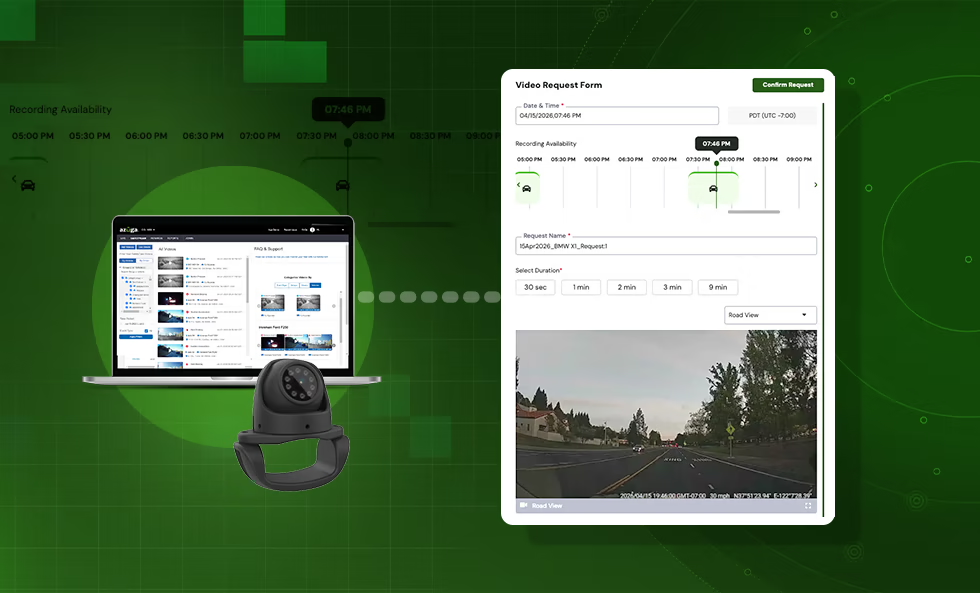

In fleet management, quick access to accurate video footage can make ameaningful difference. Whether reviewing an incident, resolving a claim, orcoaching drivers, delays in video retrieval slow down decision-making.
New enhancements in fleet video telematics are addressing thischallenge. Features like snapshot-based video navigation and automatedretry for failed video requests are helping fleets retrieve footage fasterand with less manual effort.
The Problem with Traditional Video Retrieval
Many fleets still rely on time-consuming video review workflows:
- Scrubbing through long recordings to find key moments
- Submitting multiple requests due to unclear timestamps
- Dealing with failed or delayed video retrievals
These inefficiencies can delay investigations and increaseadministrative workload, especially when fast answers are needed.
Snapshot View: Faster Navigation of Fleet Video Footage
Snapshot View introduces a visual timeline for navigating videofootage.
Instead of watching entire clips, fleet managers can scan snapshots atspecific moments in time to quickly identify relevant events.
Benefits include:
- Faster identification of incidents without manual scrubbing
- Improved accuracy when selecting timestamps for video requests
- Reduced back-and-forth caused by incorrect or incomplete clips
This approach helps teams move from searching to reviewing in less time.
Multi-Camera Visibility for Better Context
Video telematics is most useful when it provides a complete picture.Snapshot View supports multiple camera angles, including:
- Driver-facing
- Road-facing
- Auxiliary cameras
Switching between views helps:
- Validate incidents more accurately
- Provide better context for driver coaching
- Strengthen documentation for claims and disputes
Auto Retry for Video Requests
Video retrieval can fail due to connectivity or system interruptions.Auto Retry helps address this by automatically reattempting failed requests.
Key advantages:
- Higher success rates for video retrieval
- Less need for manual follow-up
- Faster access to critical footage
This reduces the risk of missing important video due to temporaryissues.
Why Faster Video Retrieval Matters
Improving how fleets access video has a direct operational impact:
- Faster incident resolution reduces downtime
- Better video context supports more effective driver coaching
- Less manual effort lowers administrative overhead
- Reliable footage access strengthens claims and risk management
As video telematics adoption grows, efficiency in managing video databecomes increasingly important.
Smarter Video Telematics Workflows
Combining visual navigation with automated retrieval creates a morestreamlined workflow:
- Identify key moments quickly using snapshots
- Submit precise video requests
- Retrieve footage reliably without manual retries
This reduces friction across the entire process, from review toresolution.
Key Takeaways
- Snapshot View enables faster, visual navigation of fleet video footage
- More precise timestamps lead to fewer repeat video requests
- Multi-camera visibility provides better incident context
- Auto Retry improves retrieval success and reduces manual effort
- Faster video access supports safety, efficiency, and risk management



